


What’s new
AI Insights
We’ve added a brand new AI Search Insights tab that reveals the hidden search queries that ChatGPT and Gemini generate when they’re answering your questions. Ever wondered what queries an AI chatbot uses when it searches the web for you?
Now you can see exactly what’s happening behind the curtain. The extension automatically extracts query fan-outs from both ChatGPT and Gemini, giving you unique insights into how AI models interpret questions and search for information.
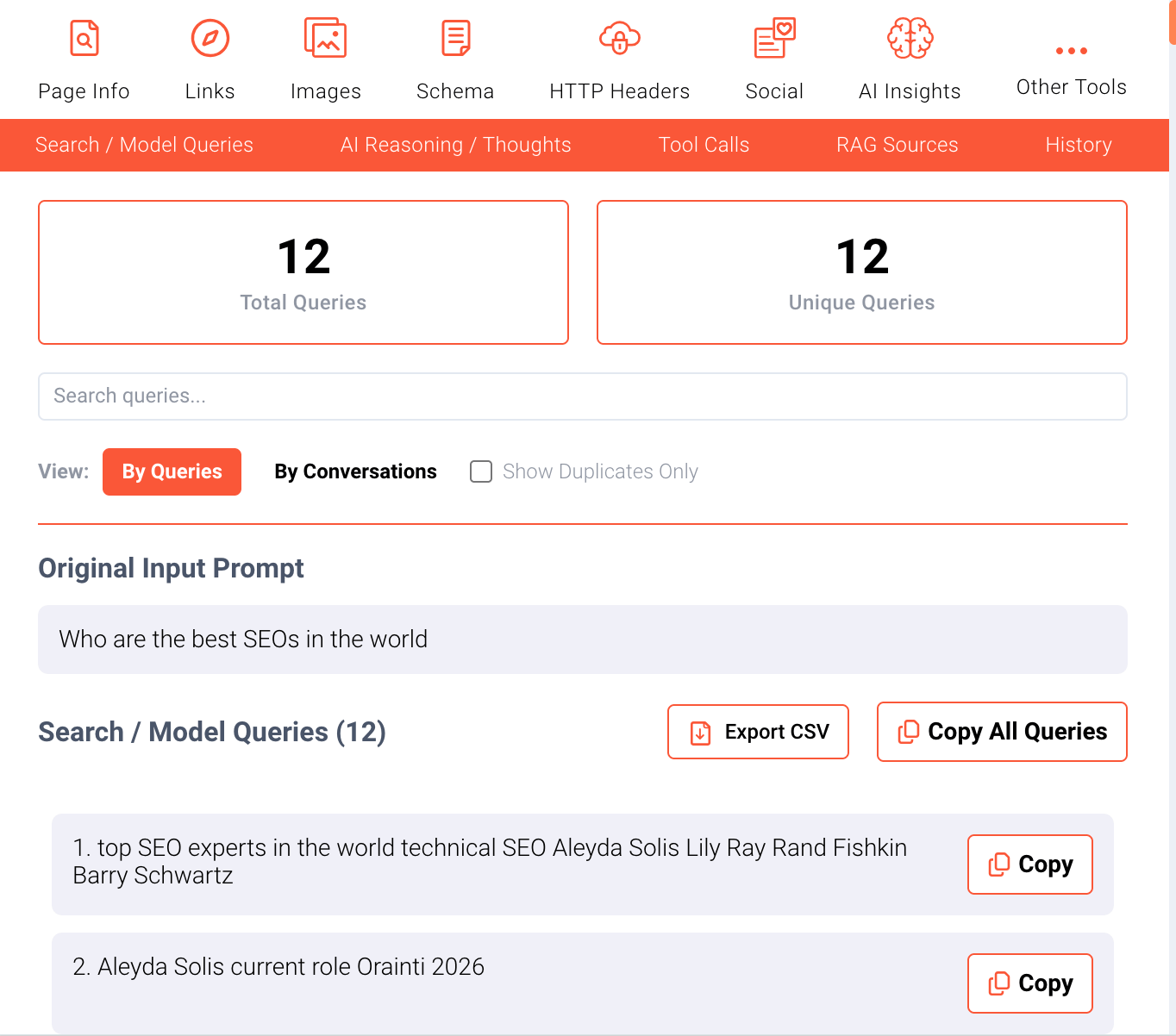
It’s like having X-ray vision into the AI’s thought process, and it’s incredibly valuable for optimizing your content for AI search visibility.
Not only can you see the queries, but we’ve also added the ability to extract AI overviews and their citations. When Google’s AI Overview feature shows up in search results, you can now capture those overviews along with all their source citations.
It’s perfect for understanding what sources AI considers authoritative and how it structures information—critical intelligence for anyone trying to rank in AI-powered search results.
Copy as Markdown
We’ve added a “Copy as Markdown” feature that makes debugging and content extraction a breeze. You can right-click on any page and select “Copy as Markdown” to get the entire page content in clean markdown format, ready to paste into your favorite editor or favorite LLM to work straight with all the copy neatly formatted.
Or use the same option from the popup menu. It’s incredibly handy when you need to quickly grab content for analysis, documentation, or just to have a clean copy of a page’s structure without all the HTML noise.
Bug fixes
- We’ve made significant performance improvements across the board. The extension is now faster and more responsive, with optimized storage operations, better memory management, and streamlined data processing. Everything just feels snappier, from opening the popup to extracting data to filtering results.
- Fixed: Storage operations that were playing favorites with Chrome. We’ve replaced all those
chrome.storagecalls with the more diplomaticbrowser.storageapproach, which works across all browsers. Firefox users, this one’s for you—your data will now persist exactly as it should, without any “this only works in Chrome” nonsense. - Fixed: A pesky issue where the extension would forget everything when Chrome’s service worker decided to take a nap. Service workers in Chrome MV3 can unload after about 5 minutes of inactivity, and when they did, all your JavaScript toggle states and status information would vanish into the digital void. We’ve now taught the extension to write important things down before it forgets, so your settings persist even when the service worker gets a bit forgetful.
- Fixed: Context invalidation checks that were using Chrome-specific APIs, causing the extension to crash on Firefox when things went wrong. We’ve updated all those checks to use the cross-browser
browser.runtimeAPI, so error handling now works consistently whether you’re on Chrome, Firefox, Edge, or Safari. - Fixed: Memory leaks and cleanup issues that were causing the extension to slowly consume more memory over time. We’ve tightened up our cleanup routines, so intervals, event listeners, and network interceptors now properly say their goodbyes when they’re done, rather than lingering around like digital ghosts.