

Paste a URL above to scan that page for broken links in seconds, or add the free Sprout SEO broken link checker Chrome extension to check links for redirects and 404s instantly, right in your browser, on every page you visit.
Broken links waste crawl budget, leak link equity, and quietly frustrate the visitors you worked hard to earn. They also accumulate faster than most teams audit them: a 2024 Pew Research Center analysis found that 23% of news webpages and 21% of government webpages already contain at least one broken link, and that 38% of pages from 2013 had vanished within a decade.
Your own links rot on the same curve every time a source moves, or you restructure a section. This tool finds broken links on any single page right now, and the Sprout SEO extension finds them continuously as you browse, with no full-site crawl and no account.
What counts as a broken link?
A broken link is any link pointing to a URL that the server cannot return successfully, which in practice falls into three status-code families:
- 404 and 410 (gone): the destination page no longer exists. This is the classic broken link.
- 3xx redirect chains that dead-end: the link points to a redirect that loops or eventually lands on a 404. It looks fine on the surface while leaking equity and slowing crawls.
- 5xx server errors: the destination is failing, temporarily or permanently.
A link can also be functionally broken while returning a 200 status. That is a soft 404: a missing page serves a “not found” message but reports success, so it hides from anything that only flags non-200 codes. A reliable checker shows you the actual status code returned, which is the only way to catch soft 404s and tell a real fix apart from a cosmetic one.
404s, dead redirects, and 5xx errors
The status code tells you which fix a link needs before you touch anything, so a checker that surfaces the raw code beats one that only shows a generic “broken” label.
| Status code | What it means | What to do |
|---|---|---|
| 404 / 410 | The page is gone | Repoint or remove the link |
| 301 (in a chain) | Permanent redirect, sometimes chained | Update the link to the final URL |
| 302 | Temporary redirect | Confirm it is meant to be temporary; otherwise, make it a 301 |
| 5xx | Server error | Recheck shortly, then escalate to the destination owner |
| 200 (soft 404) | Reports success but shows a “not found” page | Return a real 404, or restore the content |
Because each code maps to a different action, reading the code first turns a vague “this link is broken” into a specific next step, and it is the only way to catch a soft 404 that hides behind a 200.
What causes broken links?
Most broken links come from two kinds of change: change on sites you do not control, and change on your own site that you forgot to account for. External rot is the larger and more relentless source. As the Pew Research Center documented, a quarter of all webpages that existed between 2013 and 2023 were no longer reachable by the end of that window, so any page that links out will accumulate dead links over time without anyone making a mistake.
The internal causes are more fixable, and they cluster in a few predictable places:
- Restructuring: you change a slug, move a post between sections, or migrate a CMS, and old internal links keep pointing at the retired path.
- Deleted media and files: images, PDFs, and downloads removed without updating the pages that reference them.
- Typos and bad pastes: a mistyped URL, a smart-quote that breaks the href, or a tracking parameter appended to a path that does not accept one.
Knowing the cause points straight to the remedy: external rot calls for repointing or removing the link, while internal restructuring calls for a redirect or an updated link.
Why broken links hurt SEO
Broken links damage three things at once: crawl efficiency, link equity, and user trust. On crawl efficiency, every dead link and redirect chain a bot follows is budget spent reaching a dead end instead of your real content. Google’s own guidance on managing crawl budget notes that low-value URLs, including soft 404s and long redirect chains, drain the crawl capacity that would otherwise go to pages you want indexed, which matters most on large or frequently updated sites.
The second cost is link equity. A link into a 404 passes its ranking value nowhere, so an internal link pointing at a broken URL strands the authority you meant to distribute across your site.
The third cost is the one your analytics rarely attributes correctly: a visitor who hits a dead end is a visitor who may bounce back to the search results and click a competitor instead. None of these is catastrophic in isolation, which is exactly the trap. Broken links are the cheapest category of SEO problem to fix, so leaving them is a choice rather than a constraint, and a regular check is far less work than a once-a-year cleanup of years of accumulated rot.
How to find broken links on your website
There are four practical ways to find broken links, ranging from instant to after the fact:
- Scan a single page with the Sprout web tool above.
- Check links as you browse with the Sprout SEO extension.
- Review crawled errors in Google Search Console.
- Find the ones losing traffic in Google Analytics.
The first two are proactive and run on demand. The Google tools are authoritative for your own site but reactive: they report problems only after Google or a visitor has already encountered them. Most teams use a mix, leading with an instant check and using the Google reports to catch anything that slipped through.
Check a single page with the Sprout web tool
Paste a URL into the tool at the top of this page and run the scan to get every link on that page with its status code, its anchor text, and whether it is internal or external, with broken links flagged. This is the right method when you want to check one page on demand: a post before you publish it, a page a reader reported, or a competitor’s resource page you are studying for outreach.
It requires no signup or crawl, so the answer arrives in seconds rather than after a queued site audit. Run it again after you make fixes to confirm each status code resolved to 200.
Catch broken links as you browse with the Sprout extension
Install the Sprout SEO extension, and it checks the links on whatever page you are viewing, the moment you open the Links tab, with no URL to paste and no waiting. Broken links surface inline alongside their status codes, so you see redirects and 404s on the exact page you are working on.
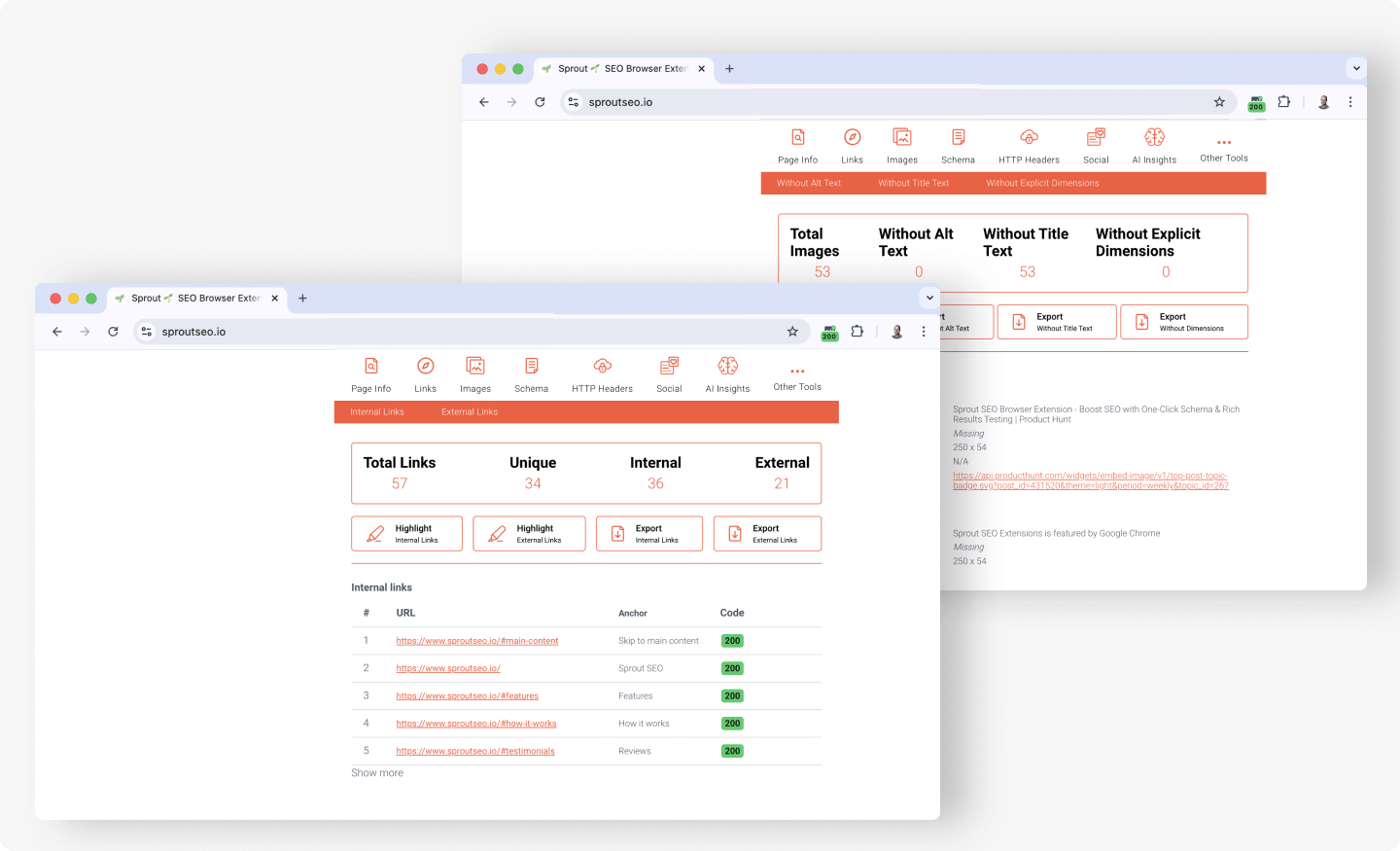
This is the fastest workflow for ongoing SEO work because the check follows you instead of you running a separate tool. The dedicated “Check every link as you browse” section below covers the filtering and highlighting in full.
Google Search Console
Google Search Console reports the broken pages Google has already crawled on your own site, and it does not show the external links you point out to. To find them, open the Indexing → Pages report (the report Google renamed from the older “Coverage”), then under “Why pages aren’t indexed,” select Not found (404) to see the list of URLs returning a 404.
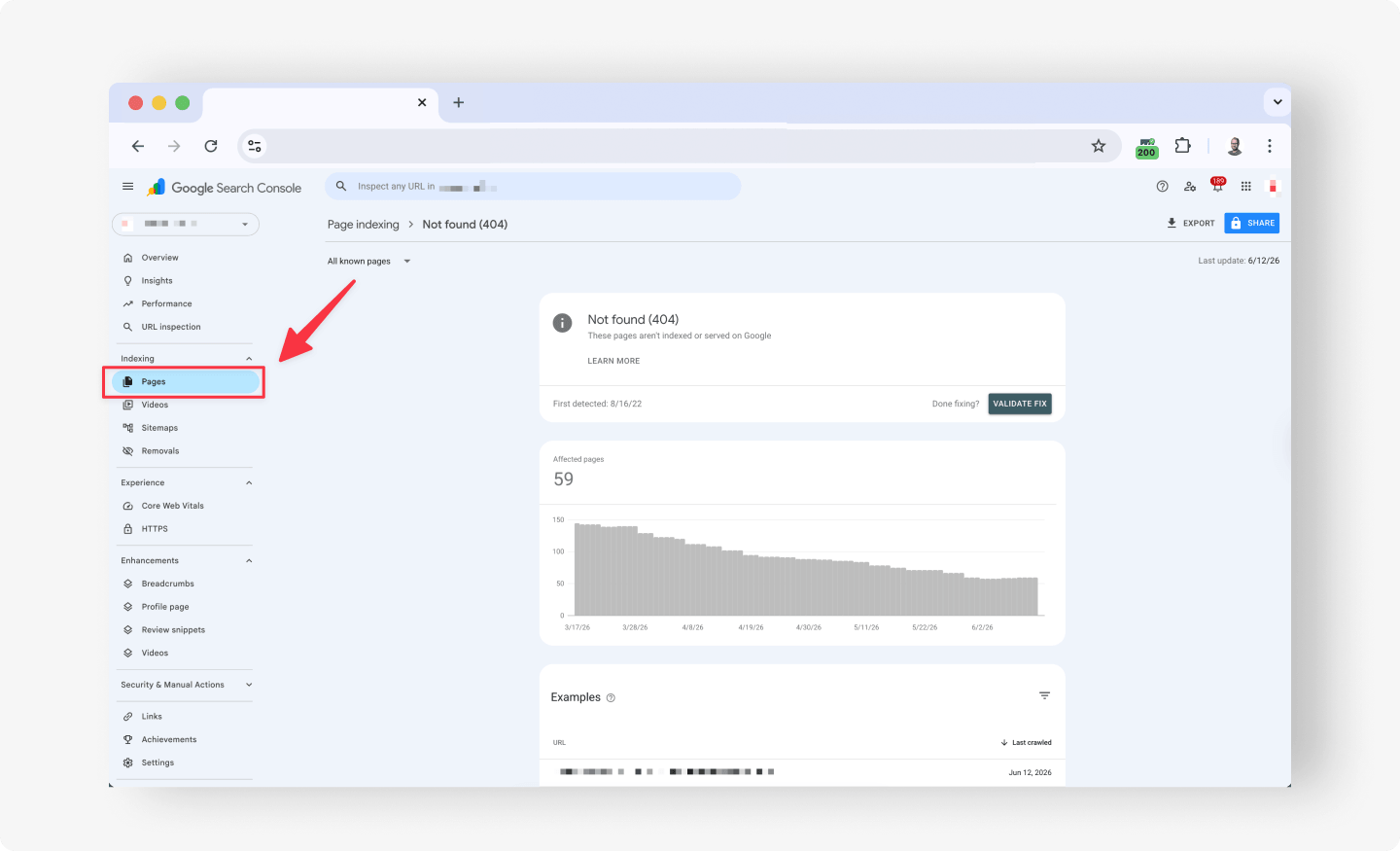
Google prioritizes these errors by importance, so a 404 on a URL that earns links and traffic matters far more than one on an obscure parameter URL, and the report effectively ranks your fixes for you. Treat this as a reactive backstop rather than a first line of defense: it shows what Google encountered days ago, not what just broke, and the habit of clearing flagged URLs regularly keeps the list short.
Google Analytics
Google Analytics finds the broken links that are actually costing you, by surfacing the URLs people land on that return your 404 page. In GA4, build a report (or a custom event that fires on your “page not found” template) filtered to your 404 page, and you get a list of dead URLs ranked by how many visits each one receives.
That traffic ranking is its real value: it tells you which broken links to fix first because real people are hitting them. Like Search Console, it is an after-the-fact signal, catching a broken link only once a visitor has already run into it, so it complements rather than replaces an on-demand check.
How to fix broken links once you find them
Choose the fix based on what the link should do now, not on a single default. The four common situations each have a clear best practice, and a fifth case (genuinely gone for good) has a specific right answer that is easy to get wrong.
- Repoint the link. If the content simply moved, update the link to its new URL. This is the default for internal links after a restructure, and it is the cleanest fix because it removes the redirect hop entirely.
- Add a proper 301 redirect. When the URL itself changed, and other pages or external sites still link to the old one, redirect the old URL to the closest current match so its equity flows through. Use a server-side 301 (via your server config, CMS, or a redirect plugin), which Google’s documentation on redirects treats as a permanent move. A
meta refreshor a JavaScript redirect is not a substitute: it is slower, weaker, and not the permanent signal a 301 sends. - Fix external links both ways. If a site you link to is broken, swap it for a live, equivalent source or remove it. If another site links to a dead page on your domain, redirect that page to keep the inbound equity. It is also worth reaching out to high-value linking sites to ask them to update the URL.
- Recreate the content. If a valuable internal page was deleted but still earns links and traffic, the strongest move is often to bring it back at its original URL rather than redirect it elsewhere.
If a page is genuinely gone with no equivalent, let it return a proper hard 404 (or 410), not a soft 404. A hard 404 tells Google the page is gone, so it drops from the index cleanly; a soft 404 returns a 200 with a “not found” message, which keeps the dead URL in limbo and wastes crawl budget. After any of these fixes, recheck the URL: a “fixed” link that still returns a 3xx chain or a soft 404 is only half done.
How to prevent broken links
Prevention costs far less than the recurring cleanup, and four habits remove most future breakage. First, check links before you publish, scanning every new or updated page the same way you check the title and meta description, so a dead link never ships in the first place. Second, make a 301 redirect a required step whenever a slug or path changes, rather than an afterthought you remember a week later when rankings dip.
Third, prefer durable sources when you link out, choosing canonical pages from stable organizations over posts that look likely to be moved or deleted, since you cannot control external rot, but you can avoid the most fragile targets. Fourth, recheck your highest-value pages on a light recurring schedule, because external links decay on their own timeline, and a quick periodic scan catches that decay long before it compounds into a large audit. Note that the goal is not to link less internally; internal links are how you distribute authority, so the fix is to keep them current, not to avoid them.
Check every link as you browse (Chrome, Firefox, Edge)
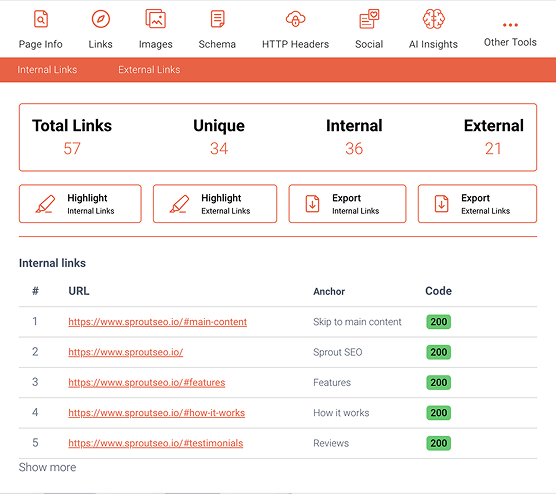
The fastest broken-link workflow runs in the browser, page by page, with no crawl and no account, and that is what the Sprout SEO extension is built for. It analyses the links on the current page the instant you open the Links tab, so checking a page is a one-click action rather than a separate task you schedule.
Highlight, filter by dofollow/nofollow, and see status codes inline
The extension shows every link with its status code (200, 301, 404, and others), highlights broken links, and lets you filter by dofollow or nofollow and by link type, so you can focus on what matters on a busy page. You read redirects and 404s directly on the page you are looking at, which is why it suits live audit work better than a tool that crawls a whole site and emails you a report later. Link checking sits alongside the rest of Sprout’s on-page and technical checks, so it is one capability of a single lightweight extension rather than a standalone download.
Analyze every link on the page for redirects and 404s, instantly, right in your browser. Add Sprout SEO to Chrome (also available for Firefox and Edge), free, with no account required.
Analyze every link, right from your browser
Highlights, filter, and check links for redirects or 404s instantly.
 Add to Chrome
Also available for Firefox
and Edge.
Add to Chrome
Also available for Firefox
and Edge.
In short
- Broken links are cheap to find and cheap to fix; the only real cost is leaving them, and they accumulate on their own as the web around you changes.
- Use the tool above for a one-off page, the extension to catch broken links continuously as you browse, and Search Console or Analytics as a reactive backstop.
- Fix by repointing, a proper server-side 301, recreating, or a clean hard 404, then recheck to confirm the status code resolved.
Add Sprout SEO to Chrome (also Firefox and Edge) to highlight, filter, and check every link for redirects and 404s as you browse, free.