


A stray 302 left where a 301 belonged is one of the most common reasons a migrated page never recovers its rankings. The site moves, the traffic dips, and weeks later the destination still has not absorbed the old page’s authority, because the server kept telling Google the move was temporary.
The 301 vs 302 redirect decision looks trivial in a control panel, yet most teams pick by habit rather than by what the status code actually signals to a search engine.
This guide covers when each redirect applies, what it does to your ranking signals, and how to confirm the live type on any URL in one click so a misconfigured redirect never quietly drains your equity.
What is a 301 redirect?
A 301 redirect is an HTTP status code that tells browsers and search engines a page has moved permanently to a new URL, and that the original address should no longer be used. The server returns the 301 status with a Location header pointing to the destination, and the browser sends the visitor there automatically.
Because the move is declared permanent, both people and crawlers treat the new URL as the real home of that content.
The permanence is the whole point. A 301 is a one-way commitment that the old page is gone for good, which makes it the default tool for migrations, rebrands, and any structural change you will not undo.
What a 301 signals to search engines
A 301 instructs search engines to transfer the source page’s ranking signals to the destination and to swap the new URL into the index in place of the old one. Google’s indexing pipeline treats a permanent redirect as a signal that the destination should become the canonical URL, so accumulated link equity, PageRank, and historical relevance flow forward rather than evaporating.
This consolidation is not instant; Google has to recrawl the old URL, see the 301, and process the destination, which is why migrated pages often wobble for a few weeks. Google’s own guidance recommends a permanent server-side redirect whenever possible, calling it the best way to make sure both Search and people land on the correct page.
Server-side matters: a redirect issued in the HTTP response is read far more reliably than one bolted on with client-side scripting.
When a 301 is the right choice
Use a 301 any time the change is permanent and you have a clear replacement destination: if you never plan to bring the old URL back, a 301 is correct. Common cases include moving to a new domain during a rebrand, changing a URL slug, consolidating thin pages into one stronger page, forcing HTTP to HTTPS, and retiring a discontinued product in favor of its successor.
One maintenance detail catches people out. Google’s guidance on site moves recommends keeping redirects in place for as long as possible, generally at least a year, because external sites and bookmarks still point at the old URL.
Remove the redirect too early and every one of those inbound links becomes a 404, so the equity you preserved leaks back out.
What is a 302 redirect?
A 302 redirect is an HTTP status code that tells browsers and search engines a page has moved temporarily, and that the original URL will be used again. Like a 301, it returns a Location header and sends the visitor to a new address, so the on-page experience is identical.
The difference lives entirely in intent: a 302 says “keep the original around, I am coming back for it.”
That distinction changes how downstream systems behave. Browsers are far less likely to cache a 302, so they recheck the server on each visit, which makes the redirect trivial to reverse and keeps the original URL as the system of record.
What a 302 signals to search engines
A 302 tells search engines the move is provisional, so they generally keep the original URL indexed and do not transfer ranking signals to the destination. Google describes the behavior plainly: Googlebot follows a temporary redirect but the indexing pipeline does not use it as a signal that the target should become canonical, though the target may still get indexed if other signals point to it.
The source page keeps its ranking ability on the assumption you will restore it, which makes a 302 protective when used deliberately and corrosive when left on a permanent move by accident.
When a 302 is the right choice
Reach for a 302 only when the move is genuinely temporary and you intend to reverse it. The clearest cases are A/B and split tests that route a slice of traffic to a variant while protecting the control page’s SEO, a maintenance or redesign window, a short-lived promotion such as a Black Friday landing page, and an out-of-stock ecommerce product you expect to restock rather than retire.
The out-of-stock product is the textbook correct 302: a temporary redirect to the parent category keeps shoppers moving while preserving the product URL’s history, so when stock returns the page picks up where it left off. Swap that 302 for a 301 and you tell Google the product is gone permanently, surrendering rankings for an item you fully intend to sell again.
301 vs 302: the side-by-side comparison
Line up what each status code means against what it does to your ranking signals, and the choice settles itself.
| Status code | Meaning | Ranking signal | Use when |
|---|---|---|---|
| 301 | Permanent move to a new URL | Consolidates equity and rankings to the destination; new URL replaces the old one in the index | The change is permanent: migrations, rebrands, slug changes, HTTP to HTTPS, merging pages |
| 302 | Temporary move; original will return | Withholds transfer; original URL stays indexed and keeps its ranking ability | The move is genuinely temporary: A/B tests, maintenance, short promotions, out-of-stock products |
Read the table as a decision rule, not a glossary. If you cannot honestly say the old URL is coming back, the answer is 301; the 302 row exists only for the narrow set of cases where reversibility is the goal.
How redirects pass (or hold back) ranking signals
Redirects are the mechanism by which a URL’s accumulated authority either follows it to a new home or stays behind, which is why the 301 vs 302 choice is a ranking decision, not just a plumbing one. The status code decides whether the signals a page earned over time, its inbound links, PageRank, click history, and topical relevance, transfer to the destination or whether it starts cold.
A 301 hands them forward; a 302 withholds that transfer because you have signaled the original will return.
The damage from getting this wrong rarely shows on day one. A permanent move served as a 302 throws no error; visitors still arrive, so the only thing that breaks is consolidation.
The destination plateaus below the rankings the source held, a gap easy to misread as a content problem when it is really a one-character mistake.
Where 307 and 308 fit
Beyond 301 and 302 sit two newer status codes, 307 and 308, that exist mainly to remove ambiguity about the request method during a redirect.
A 307 is a temporary redirect like a 302, but it preserves the original HTTP method, so a POST stays a POST instead of being downgraded to a GET. A 308 is the permanent counterpart: like a 301, with the same method-preserving guarantee.
For everyday SEO work the takeaway is short. Google treats 308 like 301 and 307 like 302 for indexing, and the pair only matters for transactional flows such as form submissions and API endpoints where turning a POST into a GET would break the request.
Otherwise, reach for 301 or 302.
Common redirect mistakes that cost rankings
Most redirect problems are the same handful of errors repeated across migrations, and each one quietly suppresses the rankings a clean redirect would protect.
- A 302 left on a permanent move. The single most expensive mistake. The page works, so nobody investigates, while Google keeps the destination out of the canonical slot and the original stagnates.
- Redirect chains. Page A redirects to B, which redirects to C. Each hop dilutes signals, slows the page, and wastes crawler resources, and Google advises you to avoid long redirect chains because they have a negative effect on crawling. Point the source straight at the final destination.
- Redirect loops. A sends to B and B sends back to A, trapping users and crawlers until the browser errors out. The page stays uncrawlable and unrankable until the loop is cut.
- JavaScript and meta-refresh redirects as substitutes. A client-side script or a
<meta http-equiv="refresh">tag can move a visitor, but it is a weaker, slower signal that search engines process inconsistently. A permanent move deserves a proper server-side 301, not a scripted stand-in.
All four share one trait: the redirect looks fine from a browser, so the SEO cost stays invisible until rankings fail to follow. Auditing the status code, not the apparent behavior, surfaces them.
How to check a URL’s redirect type in one click
The only reliable way to know whether a URL serves a 301 or a 302 is to read the raw HTTP response, because the browser follows the redirect instantly and hides the status code behind it. A config screen can claim a redirect is permanent while the server returns a 302, and you never see that discrepancy from the address bar.
You can read the response header for any URL with the free HTTP status code tool, which returns the exact status code, the Location target, and the full redirect chain without installing anything, so it is the fastest way to verify a migration’s redirects resolve to the right destinations before you sign off.
When a redirect causes a page to fall out of the index, pairing the status check with a look at whether the page is actually indexed tells you whether the redirect, a canonical, or something else is keeping it out.
Reading the redirect chain in the Sprout SEO extension
For checks you run constantly, an in-browser view beats pasting URLs into a tool. The Sprout SEO extension surfaces the live status code and the complete redirect chain for the page you are on, and its HTTP headers tab lays out the status, the Location header, caching directives, and each hop in a multi-step redirect in order.
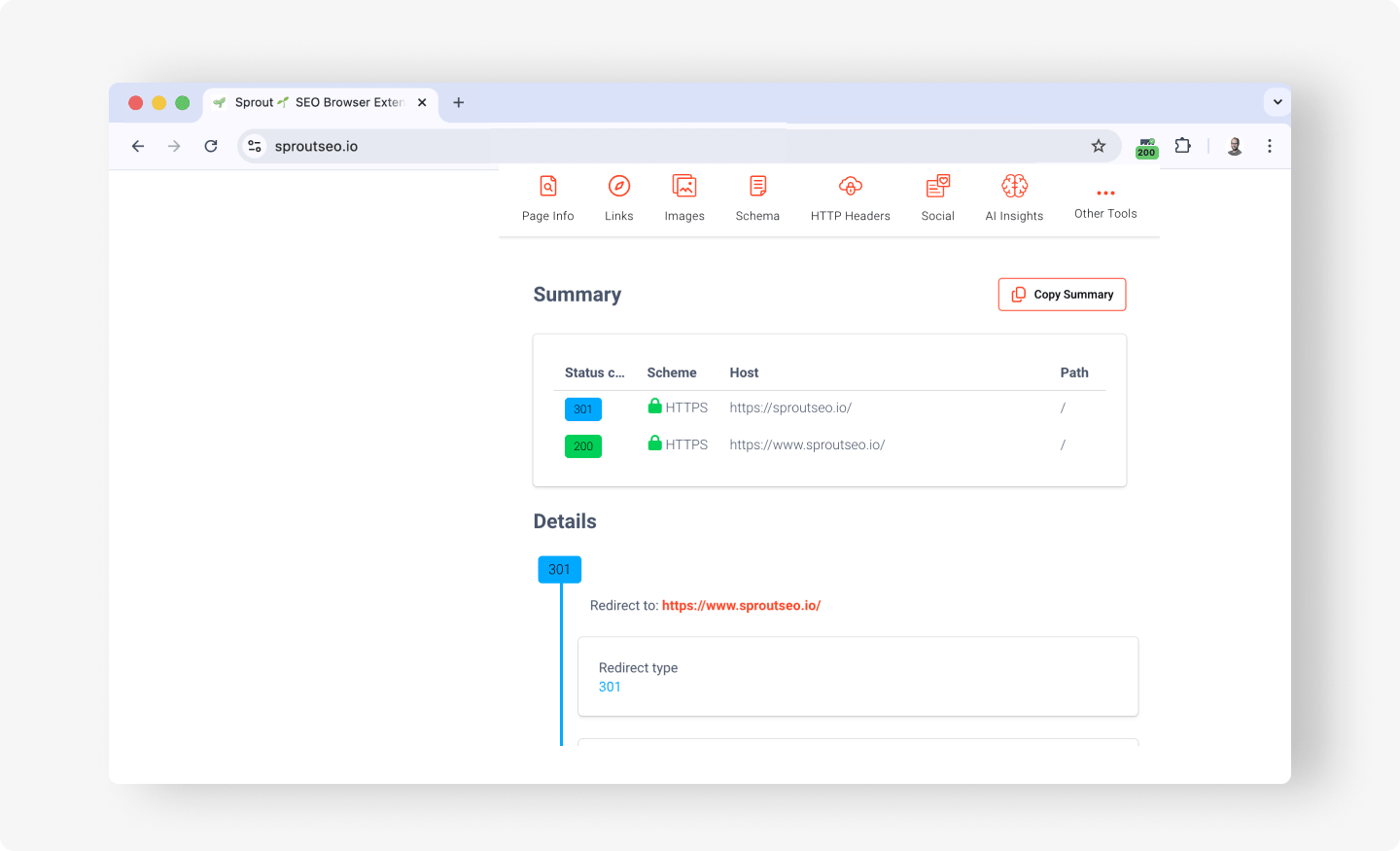
The redirect-chain view is where the common mistakes become obvious. A single permanent hop that shows two or three steps tells you there is a chain to flatten, a 302 sitting where you set a 301 jumps out before it costs rankings, and a chain that circles back to its start exposes a loop.
In short
The 301 vs 302 redirect decision comes down to one question and one habit:
- Use a 301 for any permanent move. It consolidates ranking signals to the destination and is Google’s recommended way to keep both Search and visitors on the correct page.
- Use a 302 only for genuinely temporary moves you intend to reverse, such as tests, maintenance, and out-of-stock products, where protecting the original page’s authority is the point.
- Always verify the live status code rather than trusting the config, because a 302 hiding where a 301 belongs costs rankings without breaking anything visible.
Redirects are one piece of a broader technical SEO foundation that also covers crawling, indexing, and site structure. Check any redirect chain free with the Sprout SEO HTTP status code tool, or add the Sprout SEO extension to Chrome to read the status code and full chain on every page as you browse.