


The fastest way to accidentally delete a page from Google is a noindex tag that nobody noticed. A single line in a template can quietly pull dozens of pages out of search results, and most teams only spot it when traffic to a category or a money page falls off a cliff.
The trouble is that three controls get treated as interchangeable: the noindex tag, robots.txt, and the canonical tag. They do not do the same job, and reaching for the wrong one either removes pages you wanted to keep or wastes crawl budget on pages you wanted gone.
This guide explains what the noindex tag does, when to use it, how it differs from robots.txt, and how to detect it on any page so a stray directive never costs you rankings again.
What is a noindex tag?
A noindex tag is a directive that tells search engines not to include a page in their index, so the page does not appear in search results even when other sites link to it. You apply it either as a meta robots tag in the page’s HTML or as an X-Robots-Tag HTTP response header. Crawlers still reach the page, read the rule, and then drop it from search.
In the page source it looks like a single line inside the <head>:
<meta name="robots" content="noindex">
The header form does the same job from the server side, returned alongside the rest of the HTTP response:
X-Robots-Tag: noindex
Both forms have the same effect. According to Google’s documentation on blocking search indexing, once Googlebot crawls a page and extracts the rule, Google drops that page entirely from Search results regardless of who links to it.
The distinction that trips people up is that noindex controls whether a page is indexed, not whether it is crawled. A bot must still be able to load the page and read the tag for the rule to work, which becomes the central trap covered later in this guide.
The meta robots noindex vs the X-Robots-Tag header
The meta robots tag and the X-Robots-Tag header are two delivery methods for the same instruction, and the right choice depends on the content type. The meta tag lives in the HTML <head>, which makes it the natural fit for standard web pages where you control the markup.
The X-Robots-Tag is returned as an HTTP header, so it can carry a noindex rule on resources that have no HTML at all: PDFs, images, video files, and other non-HTML documents that a meta tag cannot reach.
The header also scales better. Setting an X-Robots-Tag through a server rule or CDN configuration lets you apply noindex to a whole pattern of URLs at once, such as every file in a /downloads/ directory, without editing each document by hand.
You can target specific crawlers with either method. <meta name="googlebot" content="noindex"> restricts the rule to Google’s web crawlers, while <meta name="robots" content="noindex"> addresses every search engine that supports the rule.
One useful combination is <meta name="robots" content="noindex, nofollow">, which removes the page from the index and also tells crawlers not to pass equity through its links.
noindex vs robots.txt vs canonical: which to use when
The first sentence of any indexing decision should name the outcome you want, because noindex, robots.txt, and the canonical tag solve three genuinely different problems. noindex removes a page from search results.
robots.txt blocks crawling so bots never fetch the page at all. A canonical tag does neither: it consolidates duplicate or near-duplicate pages by naming the preferred version, and it is a hint rather than a hard directive.
Choosing the wrong one is how pages disappear that you meant to keep, or linger in the index when you meant to remove them.
| Control | What it does | Does Google see the content | Use it for |
|---|---|---|---|
| noindex tag | Keeps a crawled page out of the index | Yes, the bot must crawl the page to read the rule | Pages you want removed from search but still crawled (thank-you pages, internal search results) |
| robots.txt disallow | Blocks crawling of a URL or path | No, the bot is told not to fetch it | Saving crawl budget on low-value sections you do not need crawled (not for reliably hiding a URL) |
| Canonical tag | Names the preferred version among duplicates | Yes, both versions are crawled and compared | Consolidating duplicate or parameter pages into one ranking URL |
The practical rule: use noindex when a page should exist for users but not in search. Use canonical when several URLs are essentially the same content and you want one to rank.
Use robots.txt to manage crawl efficiency, not to hide a page, because a disallowed URL can still appear in results as a bare link if other sites point to it. For duplicate content specifically, the canonical tag is almost always the better instrument than noindex, a distinction the FAQ below returns to.
When you should noindex a page
A page is a good noindex candidate when it serves a real purpose for visitors but adds nothing to search results, or when letting it into the index would dilute or compete with your important pages.
The goal is to keep your indexed footprint made up of pages that can actually rank and convert, rather than thin or transactional pages that only inflate the count.
Common pages worth removing from the index:
- Thank-you and confirmation pages that should only be reached after a form submission or purchase, never from a search query.
- Internal site search results, which generate near-infinite low-value URLs and can trap crawlers in a maze of query strings.
- Faceted and filtered URLs, such as
/shoes?color=red&size=9, where the same products recombine into thousands of permutations that compete with the clean category page. - Staging, development, and preview environments that must never surface in front of real users.
- Thin tag, category, or author archives that hold little unique content of their own and split ranking signals across duplicate listings.
Faceted navigation is the clearest case for surgical use. An ecommerce filter set can spawn tens of thousands of crawlable combinations, and noindexing the low-value permutations keeps Google focused on the canonical category pages that earn revenue.
The judgment call is per template: noindex the filter combinations that nobody searches for, and leave indexable the handful of facets that match real demand, like a popular brand-plus-category page.
When noindex will hurt you
noindex is a precision instrument, and the same directive that cleans up your index can quietly erase pages you depend on.
The most damaging mistakes are not typos but logical conflicts, where two controls fight each other or a temporary fix hardens into a permanent one.
The most common trap is blocking a noindexed page in robots.txt at the same time. It feels thorough, but it does the opposite of what people expect.
Google’s guidance on debugging noindex is explicit that a robots.txt block stops crawlers from fetching the page, which means they never see the noindex rule sitting in the HTML or header.
The page stays eligible to appear in results, often as a bare URL with no description, and the removal you intended never happens. If you want a page out of the index, the crawler has to be allowed to reach it and read the tag.
A second risk is leaving noindex on a page for the long term. Google has indicated in past guidance that a URL kept on noindex over time can eventually be treated as noindex, nofollow, so the links on that page may stop passing value through your site.
For a page that exists only to be removed, that is fine. For a page that earns backlinks or sits in an important internal path, a permanent noindex slowly strands the equity flowing through it.
This is why noindexing pages that attract external links is risky: you remove them from search while still bleeding the authority those links were meant to build. When the goal is to retire a URL and move its value elsewhere, a 301 redirect is usually the better tool than a noindex.
How to add a noindex tag correctly
Adding a noindex tag correctly comes down to placing the rule where the crawler can read it and never contradicting it with another directive.
The method you pick depends on whether you are working with HTML pages, non-HTML files, or a CMS that abstracts the markup away from you.
For a standard web page, add the meta robots tag inside the <head> section: <meta name="robots" content="noindex">. Place it among your other head tags, not in the body, so it is parsed as part of the document’s metadata.
For non-HTML resources or when you need to apply the rule at scale, return the X-Robots-Tag: noindex HTTP header from your server or CDN. A single server rule can noindex an entire directory of PDFs or an image folder without touching each file, and you can detect that header on any URL through the extension’s HTTP response header inspection.
Most site owners never touch raw markup, and that is fine. A WordPress SEO plugin exposes a per-page toggle, usually labeled something like “allow search engines to show this page in results,” that writes the meta robots tag for you.
The one rule that overrides all the others: do not also block the page in robots.txt. Whichever method you choose, the crawler must be allowed to fetch the page, or the noindex you carefully added will never be seen.
How to check whether a page is noindexed
Checking whether a page is noindexed means confirming what the crawler actually receives, in both the HTML and the HTTP headers, because a noindex can hide in either place.
The slow way is to open the page source, search for robots, then separately inspect the response headers in your browser’s network panel for an X-Robots-Tag. It works, but it is fiddly enough that people skip it, which is exactly how an accidental noindex survives for weeks.
Google’s URL Inspection tool in Search Console confirms the indexing verdict for verified properties, and its Page Indexing report flags pages from which Googlebot extracted a noindex rule.
The faster habit is a one-click check on any page, yours or a competitor’s, without verified access to the property. A stray noindex is also one of the first things to rule out when a page is not getting indexed at all, so this is the same check you reach for when diagnosing a missing page.
That removes the friction that lets stray directives go unnoticed, and it lets you audit at the template level: check one representative thank-you page, one filtered URL, and one blog post, and you can tell within a minute whether a noindex is firing where it should and staying off where it should not.
Spotting noindex in the Sprout SEO Page Info tab
The Sprout SEO extension surfaces the indexability directives directly, so detection is at a glance rather than a source-code hunt. Open the Page Info tab on any page, and it reads the meta robots tag and the X-Robots-Tag header for you, showing whether the page is set to index or noindex, along with the rest of its on-page signals.
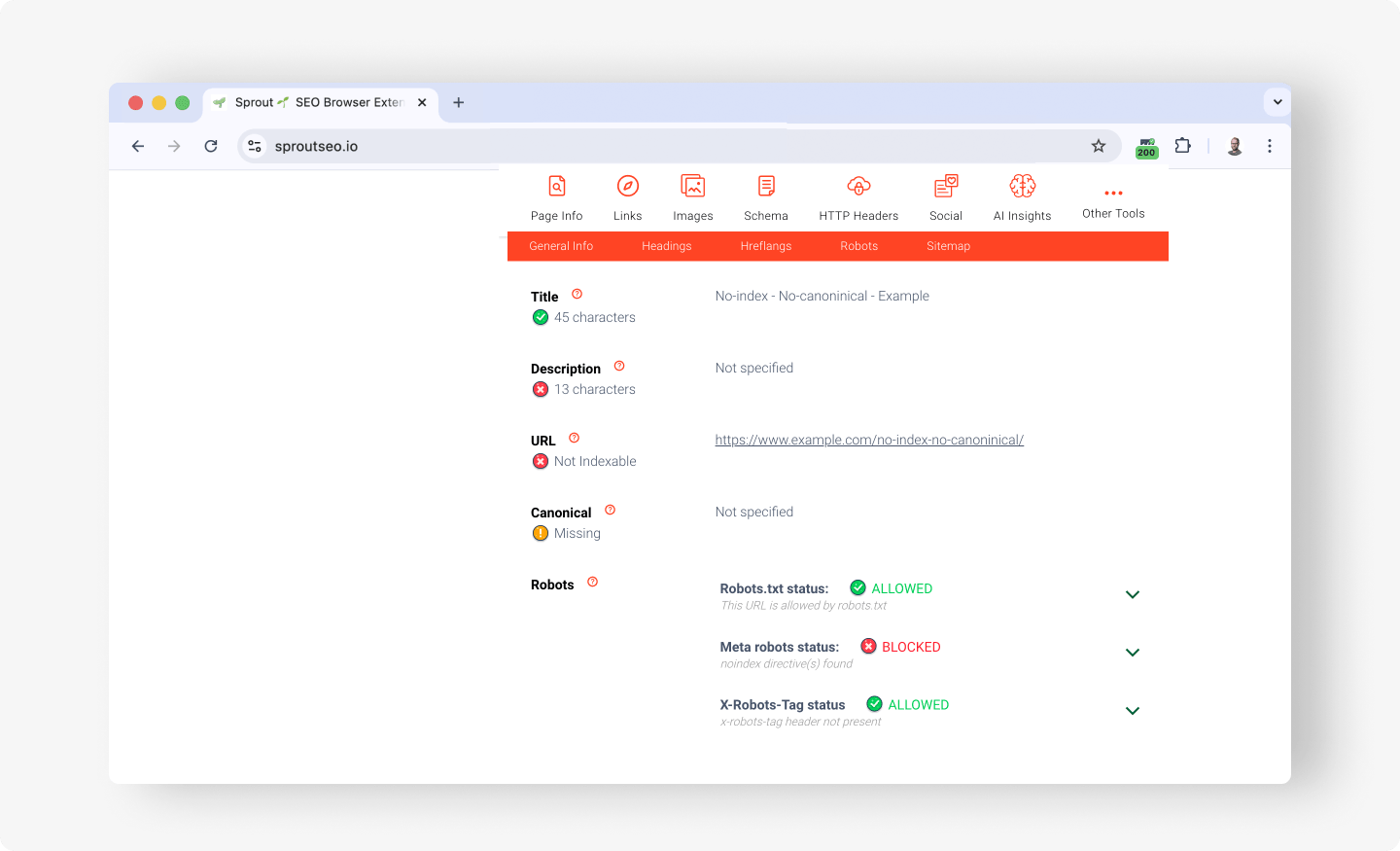
Because it works on any live URL, you can sweep a set of pages quickly, then compare a template’s behavior against what you intended without logging into anything.
In short
A noindex tag is the cleanest way to keep a page out of search results, and the cleanest way to lose pages by accident. Three points carry most of the value:
- noindex removes a page from the index but still lets crawlers follow its links unless you add
nofollow, so use it for pages that should exist for users but not rank. - Do not block a noindexed page in robots.txt, or Google can never crawl the page to see the noindex, and your removal silently fails.
- Audit templates, not just single pages, because an accidental noindex almost always leaks in through a shared template or a staging configuration, not a one-off edit.
The habit that protects you is verification: confirm what the crawler actually receives before and after any indexing change.
Indexing controls like noindex are a core part of technical SEO, so treat them with the same care as the rest of your setup.
Scan any page for a noindex tag for free with the Sprout SEO extension, and check a representative URL from each template the next time you ship.
[…] self-canonical on a page you actually wanted consolidated. To resolve a stuck page, start with the noindex tag and when to use it, since an accidental noindex is the single most common cause of “my page […]